
Contact Us

Your Premium IPTV Subscription Should Never Buffer on a Saturday Night
Last winter a friend of mine rang me at half nine on a Saturday, absolutely furious. His stream had frozen for the third time that evening, and the “premium” plan he’d paid twelve months upfront for was buffering like a dial-up modem in 2003. He asked me a simple question: how was he supposed to know?
Here’s the short answer. A premium IPTV subscription is worth the money when it delivers stable uptime at peak hours, honest picture quality, a reliable guide, real human support, a fair trial, broad device support and a provider with a long-term plan. Miss two or three of those and you’re paying premium prices for a budget service with better marketing.
I’ve spent the better part of fifteen years writing about telecoms and streaming, and I’ve tested more services than I’d care to admit. What follows are the seven signs I personally check before recommending anything to anyone, plus a look at how the business side works behind the scenes. Some of it may surprise you.
What a Premium IPTV Subscription Really Buys You
Strip away the marketing and a premium IPTV subscription is a promise about consistency. You’re not really paying for a bigger channel count, because nearly every service advertises thousands. You’re paying for the infrastructure that keeps those streams stable when half the country is watching at the same moment.
That infrastructure isn’t cheap. Load-balanced servers, redundant sources, content delivery networks spread across several regions and a support team that works evenings all cost real money. A good IPTV service provider builds those costs into the price, which is exactly why the cheapest plans so often fall apart when it matters most.
So does premium always mean expensive? Not necessarily. Some mid-priced services outperform plans charging twice as much, and I’ve seen the reverse happen more times than I can count. Price is a signal, not a guarantee.
Sign One: Uptime That Survives Saturday Night
Anyone can run a stable stream on a Tuesday afternoon. The real test comes on a busy weekend evening, when a big live event pulls huge numbers of viewers online at once and weaker servers buckle under the load.
Picture the scenario. You’ve invited friends round for a big match, the snacks are out, and the stream drops ten minutes before kick-off. That’s the exact moment a cheap plan stops feeling like a bargain.
My own method is almost embarrassingly simple. During a trial, I keep a note on my phone and check the same three or four live streams at peak times across a full weekend. If I record more than one freeze longer than a few seconds, the service goes on my “no” pile, however polished the website looks.
You can also check independent outage trackers. Downdetector, for example, logs user-reported problems for a wide range of services, and a pattern of weekend spikes tells you plenty. Community forums and Reddit threads help too, though you’ll want to read them with a sceptical eye, since some posts are planted by competitors.
Reliable premium IPTV subscription providers tend to talk openly about their server setup, backup sources and maintenance windows. Silence on those topics isn’t proof of a problem. It’s rarely a good sign, though.
Sign Two: Picture Quality That Matches the Label
Every provider loves the letters 4K and FHD. The awkward question is whether that stream is genuinely 4K or an upscaled 1080p feed wearing a fancy badge. On a large television, you’ll notice the difference within minutes.
Bitrate matters more than the resolution label. A properly encoded 1080p stream at a healthy bitrate will often look better than a starved 4K one, especially during fast motion, where compression shows up as blocky smears. Players like TiviMate let you view stream information on screen, which takes the guesswork out of it entirely.
Frame rate deserves a mention as well. Live sport and fast-moving content look noticeably smoother at 50 or 60 frames per second, and some cheaper services quietly halve that to save bandwidth. If motion looks juddery on a decent TV, that’s often why.
Your own connection plays a part too. Run a quick check with Speedtest by Ookla before blaming the provider; as a rough rule, you’ll want at least 25 Mbps of stable bandwidth for comfortable 4K viewing. If your broadband is the bottleneck, no premium IPTV subscription on earth will fix it.
Sign Three: An EPG You Can Actually Trust
The electronic programme guide is the unglamorous part of any service, and it’s where budget providers cut corners first. A broken EPG means blank listings, shows appearing an hour out of sync, or recordings that start halfway through.
Good providers update their guide data daily and match it carefully to each stream. Poor ones scrape whatever free data they can find and hope nobody notices. If you want the technical background, I’ve written a fuller explainer here: [Internal Link: how an IPTV EPG works → /what-is-epg-iptv/].
Catch-up and recording features depend on the same data. If the guide is wrong, the catch-up archive usually is too, and you’ll find yourself scrubbing through the end of one programme to find the start of the next.
During a trial, scroll through the guide a few days ahead and spot-check listings against the broadcaster’s own schedule. It takes five minutes. It’ll also tell you a surprising amount about how much care goes into the rest of the operation.
Sign Four: Support That Answers Like a Human
Support is where I’ve seen the gap between premium and pretend grow widest. A proper premium IPTV subscription comes with people who understand the product, respond within a reasonable window and can actually fix things rather than pasting a script.
Before recommending any provider, I run a small four-step test:
- Send a pre-sales question on a weekday evening and time the reply.
- Ask something mildly technical, such as how to set the service up in IPTV Smarters Pro or on a MAG box.
- Report a minor issue during the trial and see whether they troubleshoot or deflect.
- Ask directly about their refund policy and note how clearly they answer.
A provider that replies within an hour, explains things plainly and doesn’t get defensive about refunds usually treats paying customers the same way. One that goes quiet for two days during a trial will almost certainly be worse once they’ve got your money.
Sign Five: Honest Trials and Fair Refunds
Would you buy a car without a test drive? Most sensible people wouldn’t, and the same logic applies here. A 24 to 48 hour trial is standard among reputable services, and some offer a low-cost paid trial for a week, which I actually prefer because it covers a full weekend.
Be wary of two extremes. Services with no trial at all are asking for blind trust, while those offering a completely free month with no questions asked are often burning through cheap capacity to hook you in. Neither is automatically a scam, but both deserve extra scrutiny.
Refund terms matter just as much. Read them before paying, not after. A premium IPTV subscription from a confident provider will usually include a clear window, often seven days, during which you can cancel if the service doesn’t perform.
Sign Six: Device Support Without the Headaches
Most households don’t watch on one screen. There’s the living room television, a tablet in the kitchen, a phone on the commute and maybe a laptop upstairs. A premium service should work comfortably across all of them.
In practice, I look for the following:
- Well-supported apps for Amazon Fire TV Stick, Android TV and Google TV devices
- Compatibility with popular players such as TiviMate, IPTV Smarters Pro and GSE Smart IPTV
- Both M3U and Xtream Codes login options, so you’re not locked into one app
- Clear setup guides for MAG and Formuler boxes
- Honest connection limits, with the option to add extra screens at a fair price
Connection limits catch people out constantly. A plan advertised as “one connection” means one stream at a time, full stop, and trying to share it across the house usually ends with both screens freezing.
App quality matters too. A provider that maintains its own app should update it regularly, because one last touched two years ago will struggle with newer Android versions and smart TV operating systems.
Sign Seven: A Provider That Plans Beyond Next Month
This one’s harder to measure, but it may be the most important sign of all. Services come and go in this industry with alarming speed, and a twelve-month plan is worthless if the provider disappears in month four.
Clues to longevity include a registered business presence, a consistent brand that’s been around for a few years, transparent payment methods and a track record of keeping customers through server changes. An IPTV service provider that has survived several years has usually invested in its infrastructure rather than chasing quick sales.
Consumer groups such as Which? have repeatedly warned about the risks of unlicensed streaming, so it’s worth checking that any provider is open about how it operates and what it actually offers. Transparency here protects you, and it’s a strong indicator that the business intends to stick around.
Personally, I’d rarely advise anyone to pay for a full year of a premium IPTV subscription with a service they’ve used for less than three months. Start monthly, then commit once they’ve earned your trust. The small saving on an annual plan simply isn’t worth the risk.
Red Flags I’ve Learned to Spot
Over the years, a handful of warning signs have become almost automatic for me. None of them proves a service is bad on its own, but two or three together usually tell the story.
Pressure tactics top the list. Countdown timers, “only three slots left” banners and lifetime deals are designed to rush you past the trial stage, and a confident provider has no need for them. Lifetime plans in particular make little financial sense for anyone running real servers with real monthly costs.
Payment methods tell you something too. Providers that only accept untraceable payments leave you with no recourse if the service vanishes, whereas those offering card payments or established processors are at least accepting some accountability.
Then there’s the channel count arms race. When a website leads with 40,000 channels and very little else, I tend to assume the numbers are padded with duplicates, dead links and feeds nobody watches. Quality over quantity isn’t just a cliché here; it’s the whole point of paying more.
How IPTV Credits Shape What You Pay
Few subscribers realise this, but the price you pay is shaped heavily by a system most customers never see. Many services are sold through resellers, and those resellers buy IPTV credits from a main panel. One credit typically equals one month of service for one connection, so a twelve-month plan uses twelve credits.
Put simply, the chain runs in four steps:
- The main provider runs the servers and sets a wholesale price per credit.
- Resellers buy IPTV credits in bulk, often at a discount for larger volumes.
- Each reseller sets their own retail price for subscribers.
- When you subscribe, the reseller spends credits to activate your line.
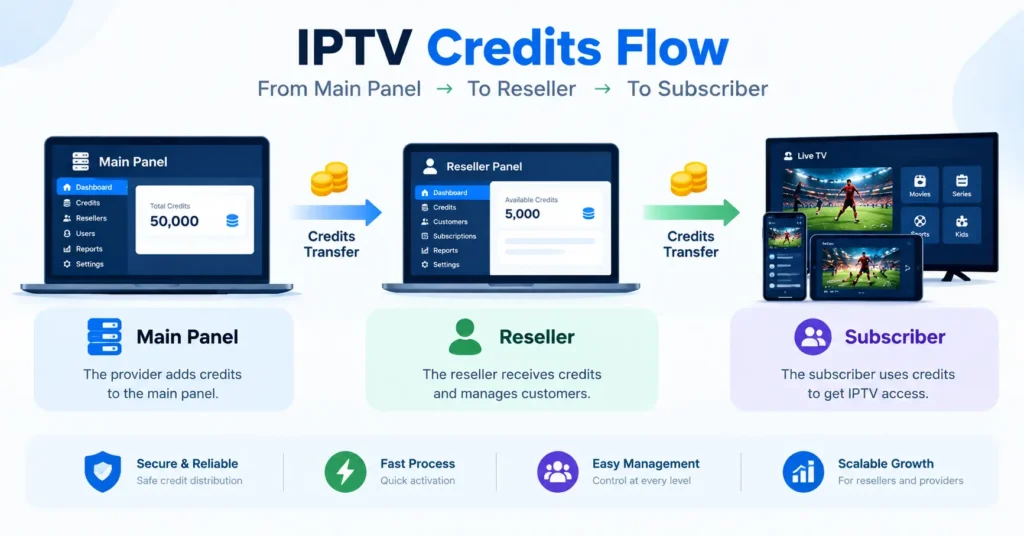
Why does that matter to you? Because two resellers selling the same premium IPTV subscription can charge very different prices, and the cheaper one isn’t necessarily worse. What changes is the quality of support, setup help and aftercare, which is where a good reseller genuinely adds value.
It also explains why some deals look too good to be true. A seller undercutting everyone may have bought IPTV credits from an unstable panel, and when that panel goes down, so does your service. Asking your seller which panel they use, and how long they’ve been with it, is a perfectly reasonable question.
Premium IPTV Subscription vs Budget Plans: A Side-by-Side Look
Numbers help here, so I’ve put the typical differences into a table based on services I’ve tested over the past couple of years. Treat these as general patterns rather than hard rules.
| Feature | Premium IPTV Subscription | Budget Plan |
|---|---|---|
| Peak-time stability | Load-balanced, rarely buffers | Frequent freezing on busy nights |
| Picture quality | True FHD and 4K at healthy bitrates | Upscaled or low-bitrate streams |
| EPG accuracy | Updated daily, well matched | Patchy or missing listings |
| Support | Human replies, usually within hours | Slow, scripted or absent |
| Trial and refunds | Clear trial and written refund window | Often none |
| Device support | Wide app and box compatibility | Limited, sometimes one app only |
| Typical monthly cost | £10 to £20 | £3 to £8 |
Admittedly, the table flatters premium services, and that’s fair, but it doesn’t tell the whole story. If you watch a couple of hours a week and never touch live events, a budget plan might genuinely suit you. Premium earns its price when you rely on the service daily, share it with family or care about big live moments.
Your Pre-Purchase Checklist
Ahead of paying for any premium IPTV subscription, run through this list. I keep a version of it saved on my own phone, and it’s spared me more than one bad decision.
- Test the trial across at least one busy weekend evening
- Check stream information in your player to confirm real resolution and bitrate
- Scroll the EPG several days ahead and compare it with official listings
- Send support a question and time the response
- Read the refund policy in full before paying
- Confirm exactly how many connections your plan includes
- Make sure the service works with your main device and preferred app
- Start on a monthly plan before committing to a year
- Check your own broadband speed so you can rule it out
Thinking of Selling Instead of Subscribing?
Occasionally, a reader emails me after going through a process like this and asks a different question entirely. Having learned what separates good service from bad, they wonder whether they could offer it themselves.
Reselling is a real business model, and plenty of people run it successfully alongside other work. You’d be buying IPTV credits wholesale, choosing a reliable IPTV service provider to partner with, and handling your own customer support. It isn’t passive income, though, and the support side takes more time than most newcomers expect.
If that path interests you, start with my practical guide:
Buy IPTV Reseller Panel: What You Actually Need to Know Before You Start → /buy iptv reseller panel. It covers panel choice, credit pricing and the questions to ask before you spend a penny.
A Final Thought Before You Subscribe
As for my friend, he eventually switched. He took a week-long paid trial, tested it across a busy Saturday and asked support a couple of awkward questions before committing. Six months on, he hasn’t rung me once about buffering, which I’m choosing to take as a compliment.
Ultimately, a premium IPTV subscription should feel invisible: you switch it on, it works, and you forget about the technology entirely. Hold every provider to that standard, trust your trial more than their adverts, and don’t be shy about walking away. Your evenings are worth more than a spinning buffer wheel.
Frequently Asked Questions
What is a premium IPTV subscription?
Essentially, a premium IPTV subscription is a paid streaming plan that prioritises stability, picture quality and support over headline channel counts. It typically includes load-balanced servers, an accurate EPG, broad device support and a responsive support team. The word “premium” isn’t regulated, so it’s worth testing any claim during a trial before paying for a longer plan.
How much should a premium IPTV subscription cost?
Reputable plans in the UK usually sit somewhere between £10 and £20 per month for a single connection, with discounts for longer terms. Anything dramatically cheaper deserves a closer look at uptime and support. Extra connections usually cost more, so factor in how many screens your household actually uses.
What are IPTV credits?
IPTV credits are the units resellers use to activate subscriptions on a provider’s panel. One credit usually equals one month of service for one connection. Resellers buy credits in bulk and set their own retail prices, which is why the same underlying service can be sold at different price points.
How do I choose a reliable IPTV service provider?
Start with a trial that covers at least one busy weekend evening, and check stream stability, picture quality and guide accuracy. Contact support with a question and note how quickly and clearly they reply. Look for transparent refund terms and a provider with a track record of several years rather than a few months.
Can I use one subscription on several devices?
Generally, you can install the service on several devices, but the number of simultaneous streams depends on your connection limit. A one-connection plan allows one stream at a time, so watching on two screens at once will cause problems. If your household watches separately, ask your provider about multi-connection plans before you buy.
[…] matters so much, read Your Premium IPTV Subscription Should Never Buffer on a Saturday Night → / Premium IPTV Subscription . It covers the viewer side of the story, which is the side your customers live on. Reading it […]